I like gromit. It is a tool to do desktop/screen annotation - you can draw on your screen as if it is a big canvas. It is useful to direct attention when you're doing presentation - instead of waving your mouse, just draw a big circle on the items you want to talk about.
Well at least, I like the idea. Because it is not working from me, and as much as I tried, I can't get it to work correctly. The code itself is good; the problem is probably the change in the underlying GDK/GTK that it depends on.
So I decide to write one myself; this time it depends only on Xlib (the basic X11 library).
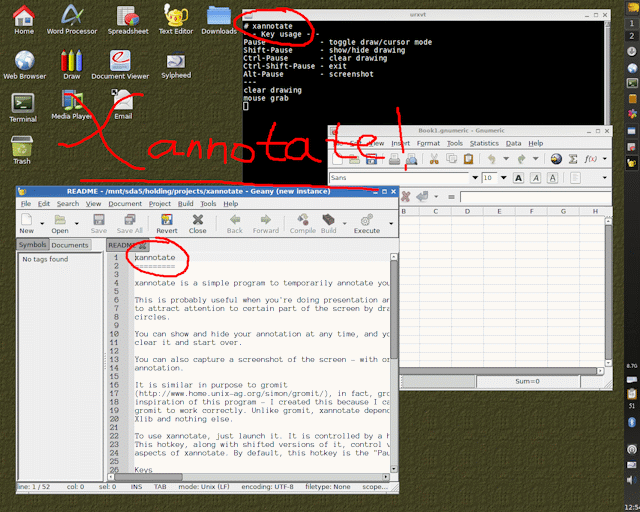
Picture is worth a thousand words, so here is a screenshot:
Features:
Interested? Get is from here. The package also contains Xscreenshot.
Keys usage
Button usage
Command line options
There are a few aspects of the program you can control by passing options.
 -h       : brief help
 -k key   : use 'key' as the hotkey (default is 'Pause')
 -w width : use 'width' as the default pen width (default is 5)
 -e width : use 'width' as the default eraser width (default is 20)
 -p path  : path/filename for screenshot (default is $HOME/xannotate)
 -n index : the starting index used for screenshot filename
 -a       : enable alpha for use with XRENDER composite. You must be running
            an X composite manager (xcompmgr, compton, kwin) for this to work.
 -1 colour: colour for pen1 (default red)
 -2 colour: colour for pen2 (default green)
 -3 colour: colour for pen2 (default blue)
BUGS:
You can make it faster by using the alpha (-a) option but you must be running a window manager with composite ability (kwin) or running an independent X composite manager (xcompmgr, compton) otherwise you will get a black screen.